Black Box Stocks Review
Value
Scanners
Ease of Use
Alerts
Chat Room
Additional Features
Summary
Black Box Stocks is a stock and options scanner platform that has the trading world buzzing. Black Box Stocks uses real-time algorithms, enhanced social media features, and a wide variety of other tools. Read now to find out if this stock and options scanner platform is what you’ve been looking for.
About BlackBoxStocks
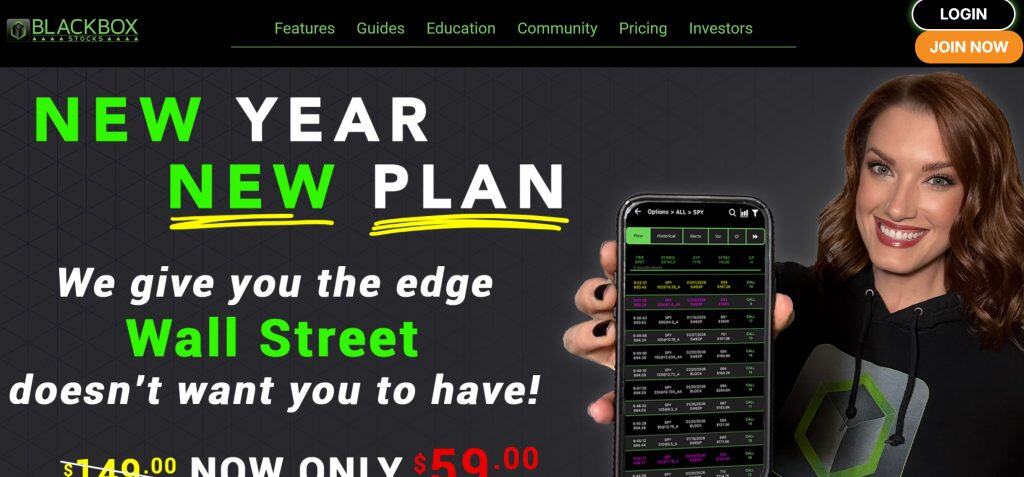
BlackBoxStocks launched in 2016 and has grown into a community of thousands of traders. It covers more than 10,000 stocks on the NYSE and NASDAQ, plus all US options markets.
BlackBoxStocks Pricing
BlackBoxStocks offers four plans:
Options Basic ($59/month or $449/year): Access to real-time options flow and alerts only.
Options Plus ($79/month or $659/year): Adds historical options data, dark pool data, proprietary technical indicators, pre- and post-market scanners, and access to options chatrooms.
Equities Plus ($89/month or $749/year): Volatility indicator, pre- and post-market scanners, dark pool data, and access to equities trading rooms.
Equities & Options Premium ($149/month or $858/year): Everything in Options Plus and Equities Plus, plus data downloads.
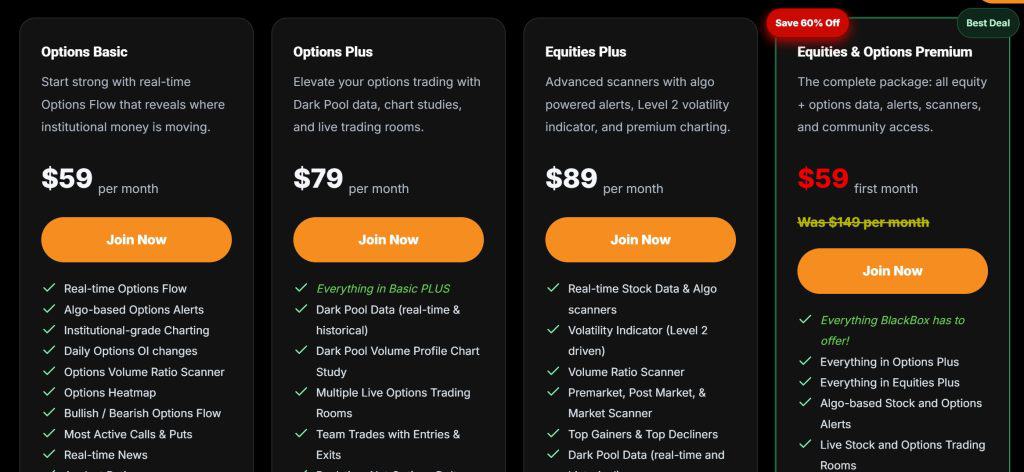
I’d strongly recommend the Options Plus plan at a minimum, since BlackBoxStocks’ dark pool data, proprietary technical indicators, and chatrooms are a major part of the platform. The Options Plus plan is suitable for most options traders and the Equities Plus plan is good for most stock traders. But if you want to use options data to inform equity trades, you’ll get the most out of the platform with the Equities & Options Premium plan.
Unfortunately, there’s no free trial available. So you have to sign up for a 1-month subscription in order to try out the platform.
Special Offer
Check Out the Latest Discounts on BlackBoxStocks
BlackBoxStocks Features
Volatility Indicator and Scanner
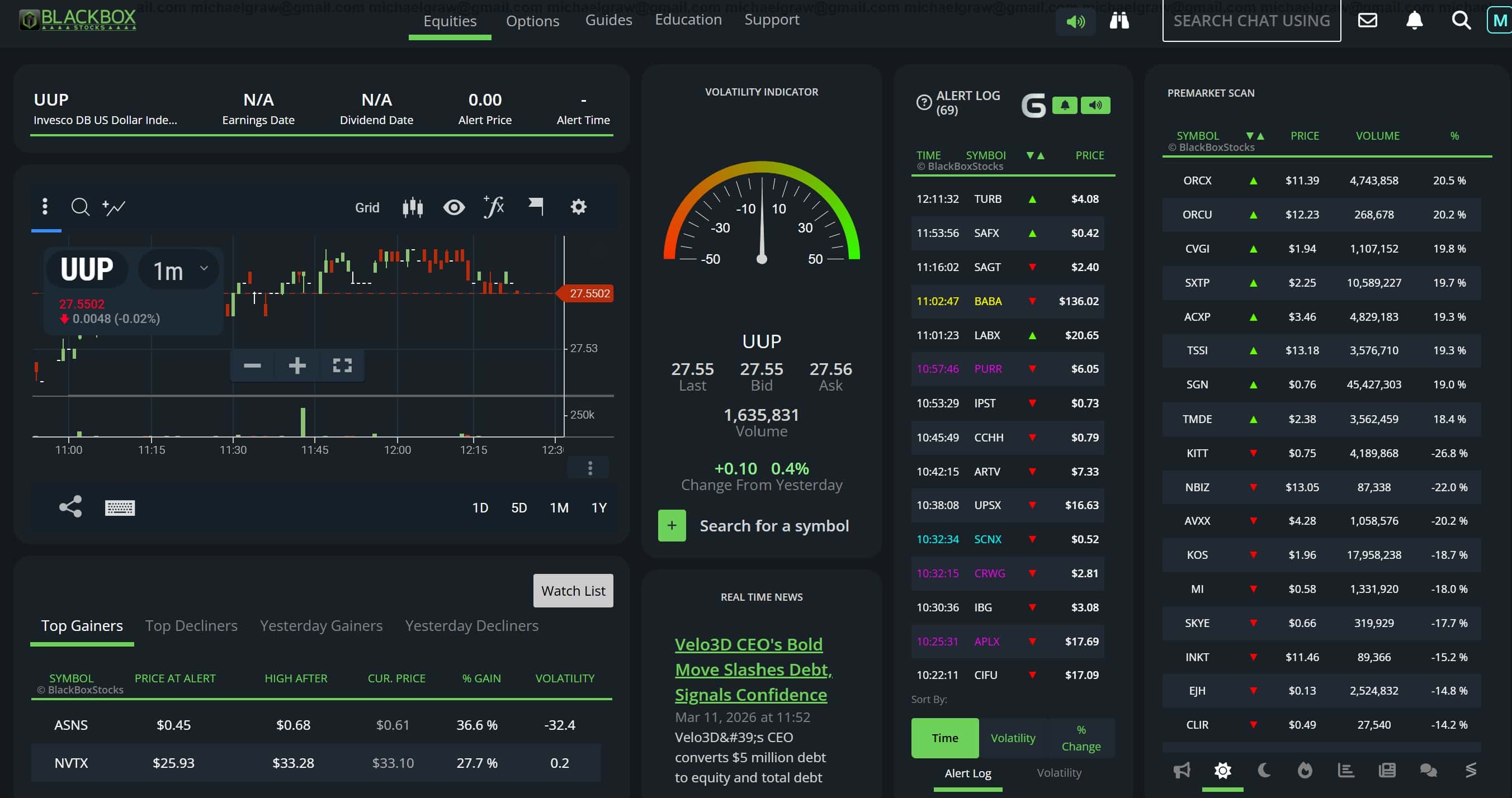
One of the most visible and unique features of BlackBoxStocks is the volatility indicator. This is a red-to-green speedometer that shows the relative volatility of any ticker, with green indicating higher volatility and greater trading potential. This is a great way to look at a stock and immediately get a sense for whether there’s a trading opportunity or not.
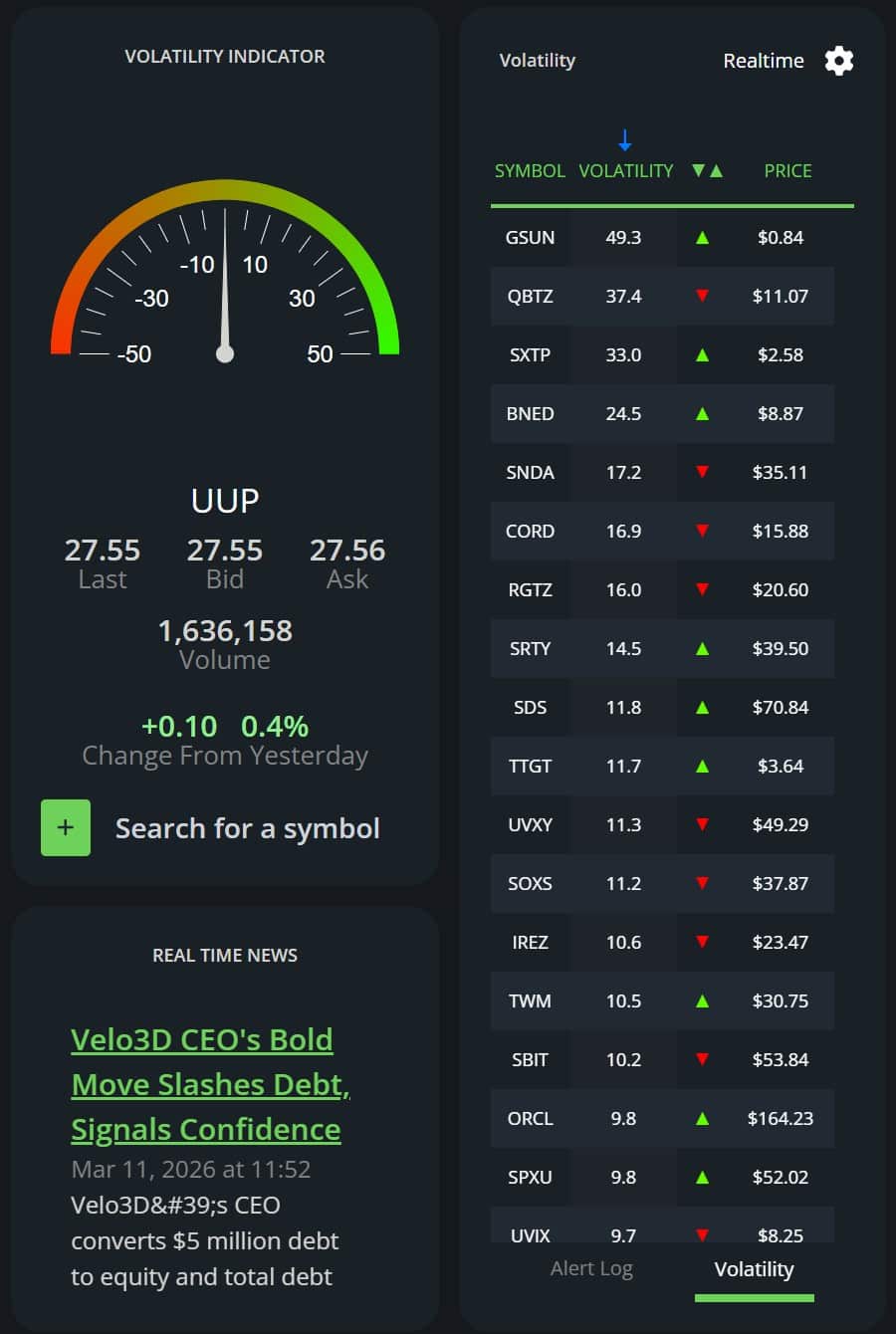
To help you find high-volatility stocks, BlackBoxStocks also offers a volatility scanner. This can be updated in real-time or in intervals up to 1 minute to slow down results on high-volatility days. You can filter price using presets up to $100, but you can’t filter based on other technical indicators or even whether price is up or down on the day. I liked the scanner a lot for finding penny stock intraday runners, but the lack of other filters makes it difficult to use for spotting breakouts or momentum opportunities.
Charting and Technical Indicators
BlackBoxStocks offers access to institutional-grade charts using ChartIQ. They’re not especially customizable, but they look great out of the box and offer useful timeframe presets for day trading. True chartists will find BlackBoxStocks’ charts limiting, but a lot of traders will appreciate the simplicity.
What I liked best about the charting interface was the fact that you could easily monitor multiple charts on the same screen. The software offers several pre-made layouts, and you can easily build a custom grid to display up to 25 charts at once. The charting interface is built into the main BlackBoxStocks dashboard, so this is great for monitoring several symbols with active alerts.
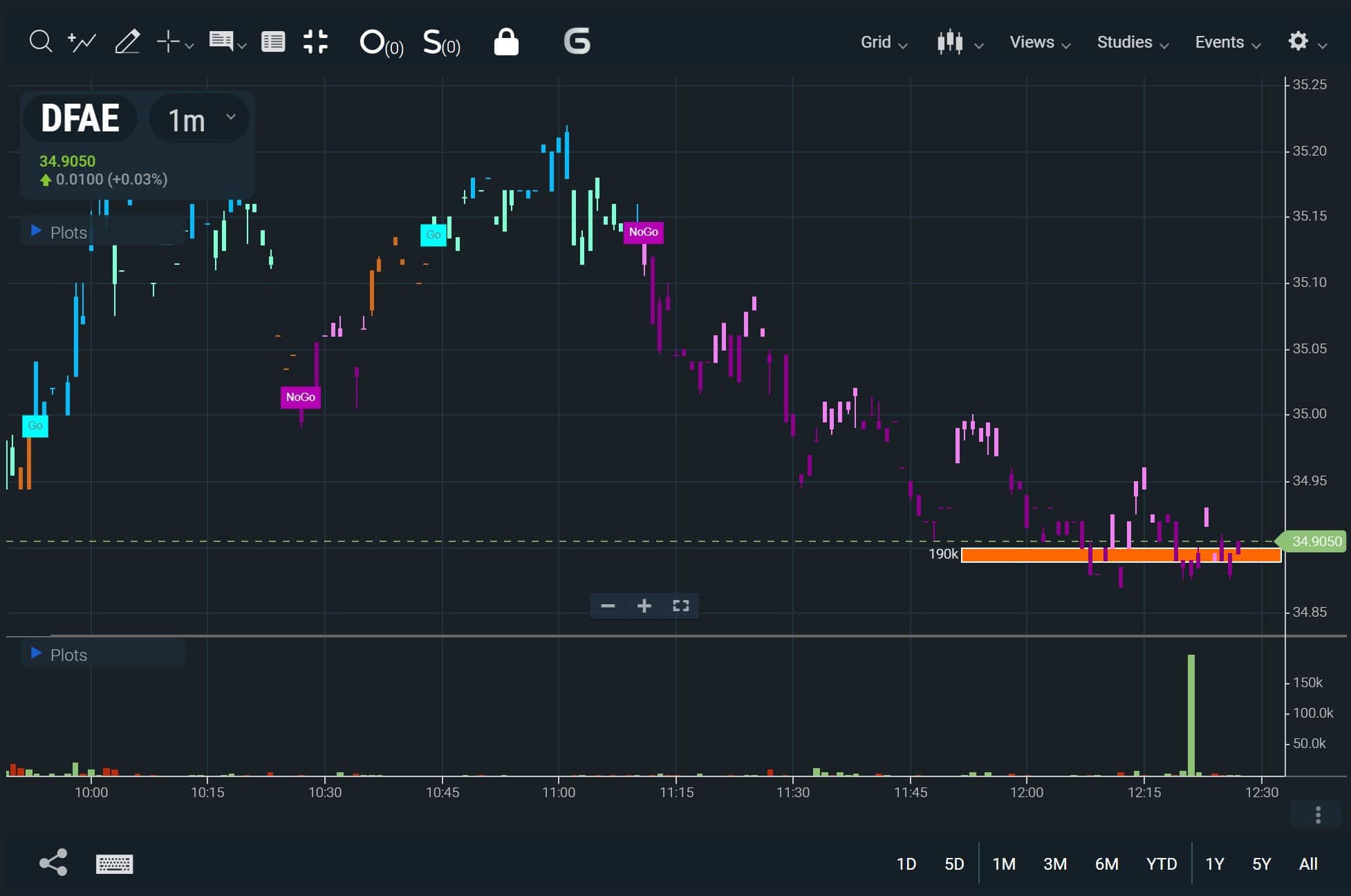
BlackBoxStocks charts support hundreds of popular technical indicators, and the platform also comes with a handful of its own proprietary indicators. Two of the most noteworthy are the Dark Pool Volume and the Go/No-Go Study.
The Dark Pool Volume indicator overlays dark pool trades as a histogram on the y-axis, allowing you to visualize areas of institutional support and resistance. The Go/No-Go Study colors candlesticks based on a ticker’s momentum, making it easy to see whether a trend is active and whether it’s likely to continue. This is a terrific indicator for momentum traders.
Alerts
Alerts play a central role in BlackBoxStocks by notifying you of potentially tradeable opportunities in real-time. The alert stream is always active in both the Equities and Options dashboards within the platform, and remains visible even when you’re charting in full-screen mode. Alert criteria are set by BlackBoxStocks using proprietary algorithms, so you don’t have to worry about customizing these at all.
There are several different types of alerts, including for 52-week highs and lows, unusual options activity, unusual dark pool activity, block trades, halts, and insider buying or selling. You can filter the alerts stream to specific types of alerts or to tickers in your watchlist. Each alert includes useful information, such as the size of unusually large dark pool trades and their volume relative to the stock’s total trading volume on the day.
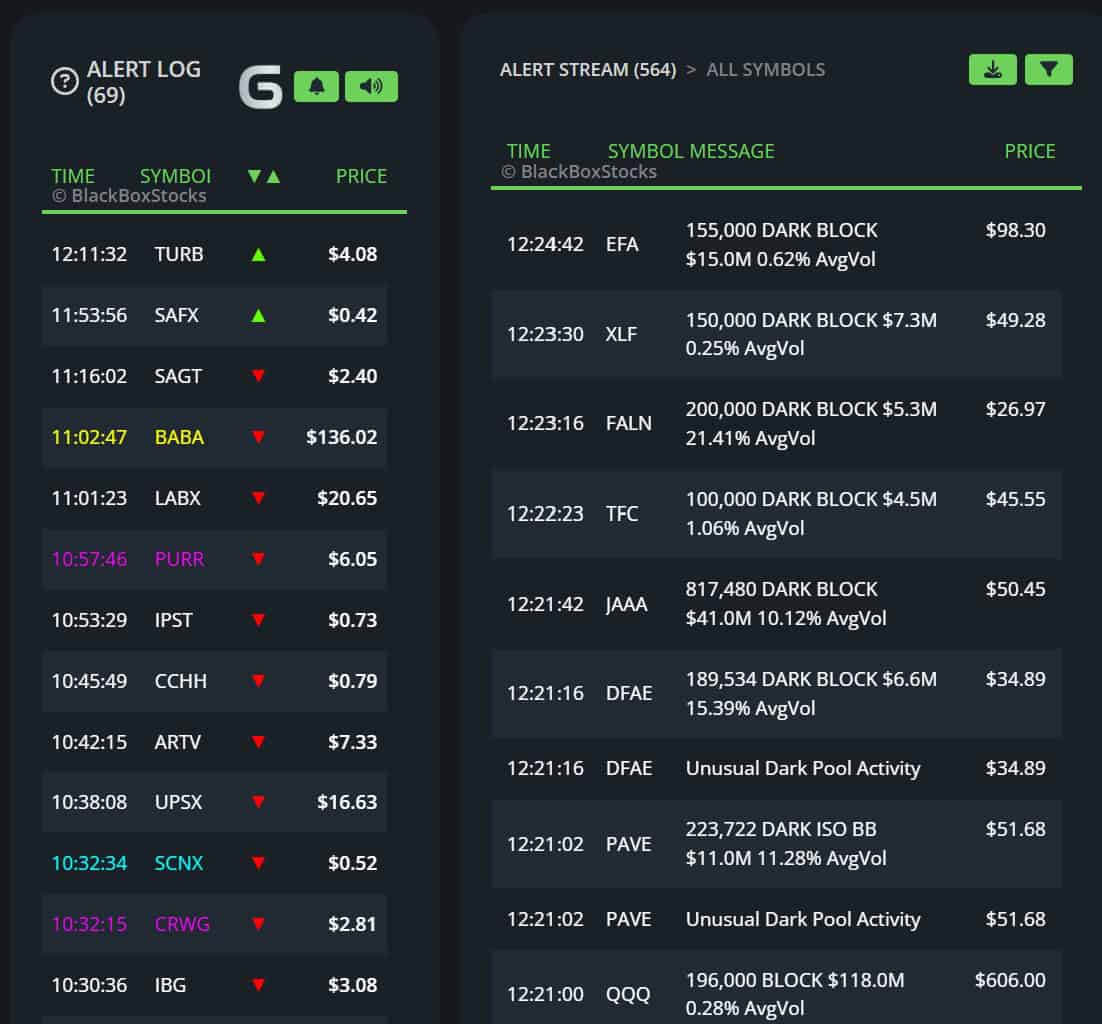
A separate alert log offers additional price and volume-focused alerts. I use this primarily to find stocks that are experiencing sharp movements up or down intraday, which could potentially indicate a breakout or breakdown. Alerts are color-coded by type, so it’s pretty easy to get a sense for which alerts matter to your trading style and focus on those.
Market Scanners
BlackBoxStocks also offers pre-configured market scans for pre-market, intraday, and post-market. Which tickers appear in the pre- and post-market scans is based on a combination of percent change and volume, so you see very actionable candidates. The intraday scanner displays the biggest gainers and losers from both today and yesterday.

Options Flow
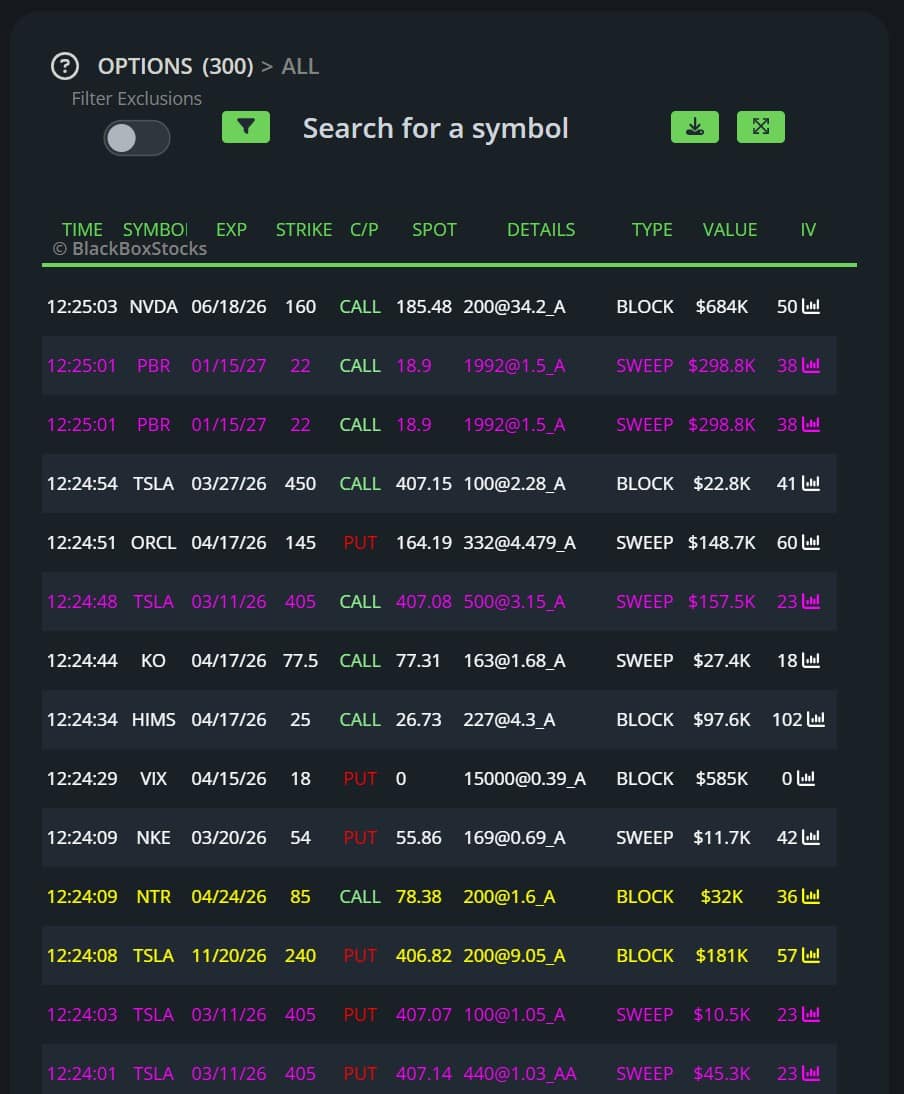
BlackBoxStocks has an Options dashboard that looks very similar to the Equities dashboard, but the main intraday data feed is focused on options data. You can view a real-time feed of unusual order flow, scan contracts by open interest, view put and call volume for individual tickers, and monitor options-specific alerts.
I find the unusual order flow feed to be a nice tool for both stock and option trading. Trades are color-coded according to type and volume, and combined with BlackBoxStocks’ dark pool data the options feed paints a good picture of what institutions are doing. BlackBoxStocks allows you to filter the unusual flow feed, but it’s still not nearly as customizable as dedicated options order flow tools like Unusual Whales or Cheddar Flow.
Real-time News
BlackBoxStocks offers a real-time news feed and a StockTwits feed. These aren’t groundbreaking at all, but having them right in the main Equities dashboard means it’s easy to check for breaking news when a stock alerts on price or volume.
Trading Chatrooms
Perhaps the best feature of BlackBoxStocks is the trading community. The platform has its own Discord server with several chatrooms, including four moderated chatrooms led by professional stock and options traders. These chatrooms are a constant source of actionable trade ideas and you get entry and exit prices for each idea so you can simply trade along with the pros.
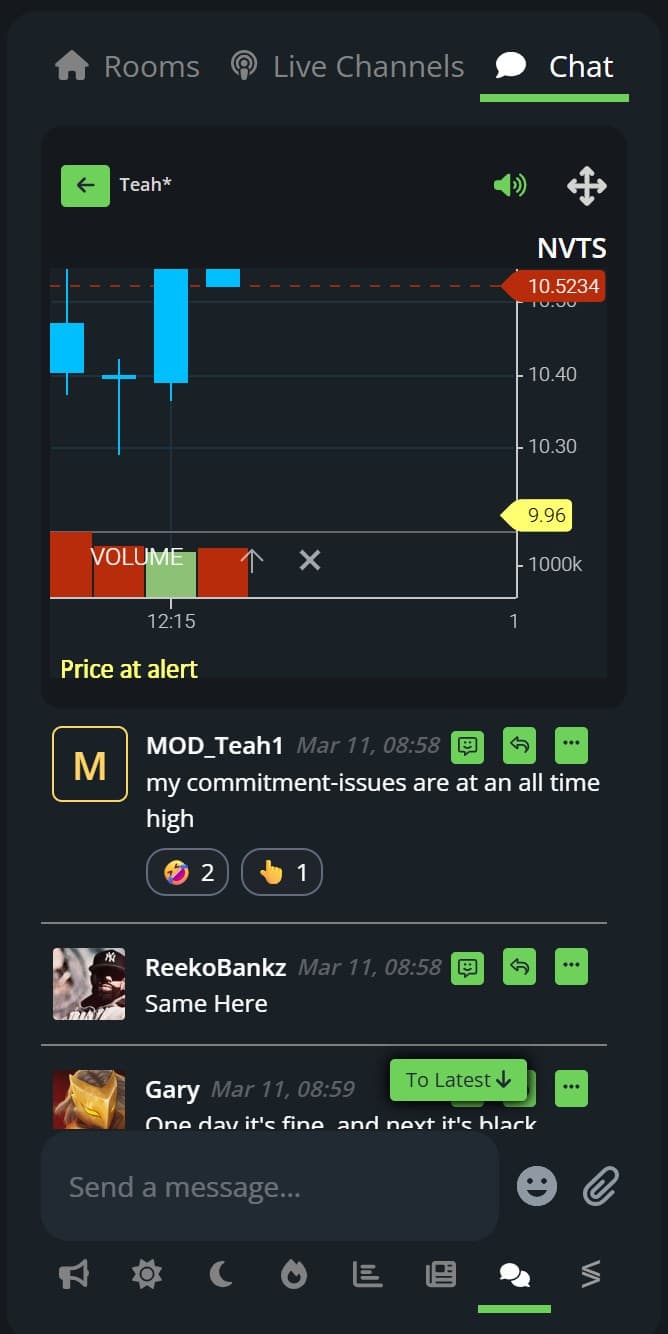
The chatrooms are also very active, which adds to the feeling of trading in a supportive community.
Is BlackBoxStocks Easy to Use?
While I had a good experience with BlackBoxStocks overall, the platform could benefit from some user interface improvements. Currently, there’s no way to adjust the size of any of the modules within the Equities or Options dashboards. You really need a large monitor to contain everything in one screen, and there’s no way to split up the interface across multiple screens.
I also wish BlackBoxStocks offered more documentation about its platform. There is an online knowledge base, but it doesn’t actually explain what all the features are or how they work. There are few screenshots and no tutorial videos. If you don’t have prior experience with day trading platforms and alerts, you may have a difficult time getting started with BlackBoxStocks.
The good news is that BlackBoxStocks does offer live introductory classes on a regular basis. I strongly recommend attending one of these classes to get your bearings in the platform and learn how to adapt the various tools to your trading strategy.
BlackBoxStocks Platform Differentiators
BlackBoxStocks is an all-in-one scanning, analysis, and trading platform. It’s most similar to other combined trading platforms and communities like Investors Underground, but BlackBoxStocks takes a pretty different approach to the market. The focus is really on pre-programmed alerts and scans so you can trade using BlackBoxStocks’ system rather than trade your own fully custom strategy.
The inclusion of so many tools in one place is also a key reason to consider BlackBoxStocks. You get institutional-grade charts, unusual options order flow, dark pool data, scanners, and a trading community all in one platform. A lot of platforms offer more depth and flexibility within each of these categories, but I haven’t encountered another software that offers all of these tools together in an integrated system.
What Type of Trader Is BlackBoxStocks Best For?
BlackBoxStocks is a good fit for a wide variety of intermediate to advanced day traders. It can work for both stock and options trading, and you could even use it for short-term swing trading. Penny stock traders will love the preset alerts and filters in BlackBoxStocks, but it works equally well for traders focused on mid- and large-cap stocks.
Special Offer
Check Out the Latest Discounts on BlackBoxStocks
The key thing to keep in mind is that BlackBoxStocks isn’t very customizable. Its purpose is to set you up with an all-in-one trading system that’s ready to use as soon as you sign up. If you want streamlined simplicity, BlackBoxStocks is a great choice. If you want maximum flexibility or need a platform that can conform to your strategy, BlackBoxStocks won’t be a good fit.
Is BlackBoxStocks Worth It?
At $858 per year for the Equities & Options Premium plan, I think BlackBoxStocks is a pretty good deal. You get a lot of different tools that, purchased separately, would cost a lot more than that.
For example, you could use BlackBoxStocks to replace a TradingView subscription, a Benzinga Pro subscription, and an Unusual Whales subscription. Those three platforms together would run you nearly $1,500 for similar capabilities, and BlackBoxStocks also saves you from having to switch between multiple platforms.
That said, if you don’t need all of the features that BlackBoxStocks offers or want more customization options, you may be better off purchasing charting, news, and options flow software independently.
Pros
All-in-one platform with charting, options data, trading chatrooms, and more
Unique volatility indicator and scanner to find trading opportunities
Pre-configured market scanners and alerts
Very high-quality charting with proprietary indicators
Active chatrooms with actionable trade ideas from pro traders
Cons
A little more customization would be nice
Documentation could be improved with video walkthroughs
No free trial, so you have to pay to test out the platform